 OurBrewbot
iSpindels
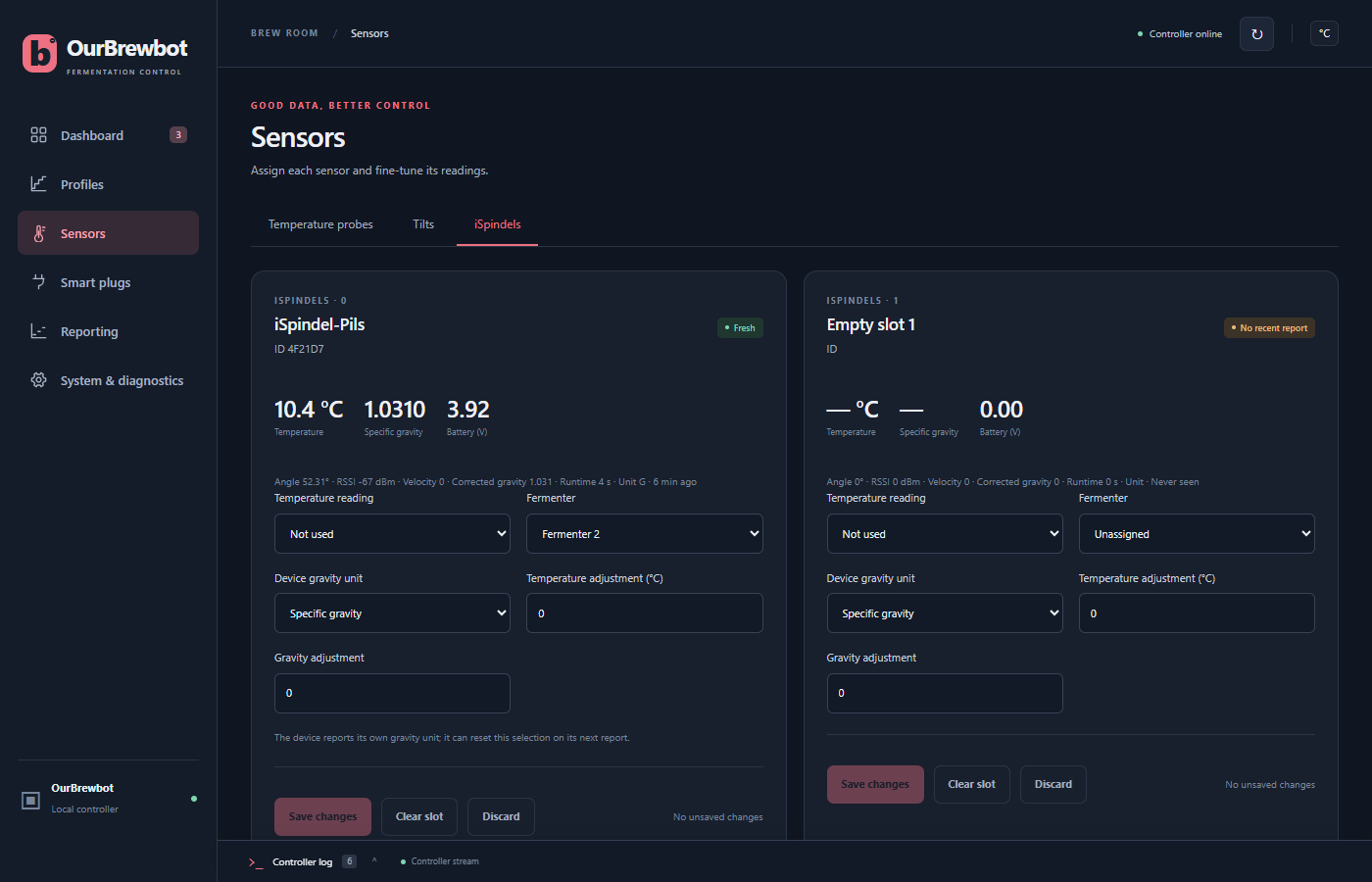
An iSpindel sends its readings to the controller over your WiFi. The iSpindels tab on the Sensors page has a slot for each of up to four iSpindels.
Pointing an iSpindel at the controller#
In the iSpindel's own setup page, choose the HTTP service and enter:
| Setting | Value |
|---|---|
| Server address | The controller's IP address, such as 192.168.1.50 |
| Server port | 80 |
| Server URL | /iSpindel (with a capital S) |
GravityMon, and other iSpindel-compatible hydrometers, work the same way.
The first time an iSpindel reports, the controller gives it the first free slot. Its card then shows its name, its ID and its readings. Each later report goes to the same slot, matched by its ID, or by its name if it has no ID.
Setting up an iSpindel#
A new iSpindel isn't used for anything until you choose its Fermenter and press Save changes.
Temperature reading decides whether the fermenter is controlled from the iSpindel's thermometer:
- Beer temperature controls the fermenter from the iSpindel, if it has no Tilt or beer probe. See which reading controls a fermenter.
- Not used takes only the gravity from the iSpindel.
The fermenter's gravity comes from the iSpindel unless it also has a Tilt, which is used first.
Each fermenter can have one iSpindel. The controller refuses to give a fermenter a second one, because only one would ever be used.
Gravity unit#
An iSpindel can report its gravity as specific gravity or in degrees Plato. The controller works in specific gravity and converts Plato readings.
Most iSpindels say which unit they're using, and then Device gravity unit is set from that
on every report. For one that doesn't say, set it yourself. A new iSpindel that doesn't say is
taken to be sending Plato, unless its name ends in [SG].
Is it still reporting?#
The badge says Fresh while the iSpindel is reporting, and No recent report when it has gone quiet. Its readings are only used while it's fresh: up to three times its reporting interval since its last report, and at least an hour. After that, the fermenter falls back to its other sensors, or to the gravity estimate.
The line under the readings shows the iSpindel's angle, WiFi signal, corrected gravity, run time and how long ago it last reported.
Calibrating and clearing#
Temperature adjustment and Gravity adjustment are added to the iSpindel's readings. Clear slot forgets the iSpindel and its settings, freeing the slot for another. If it reports again, it's given a slot as if it were new.