 OurBrewbot
Smart plugs
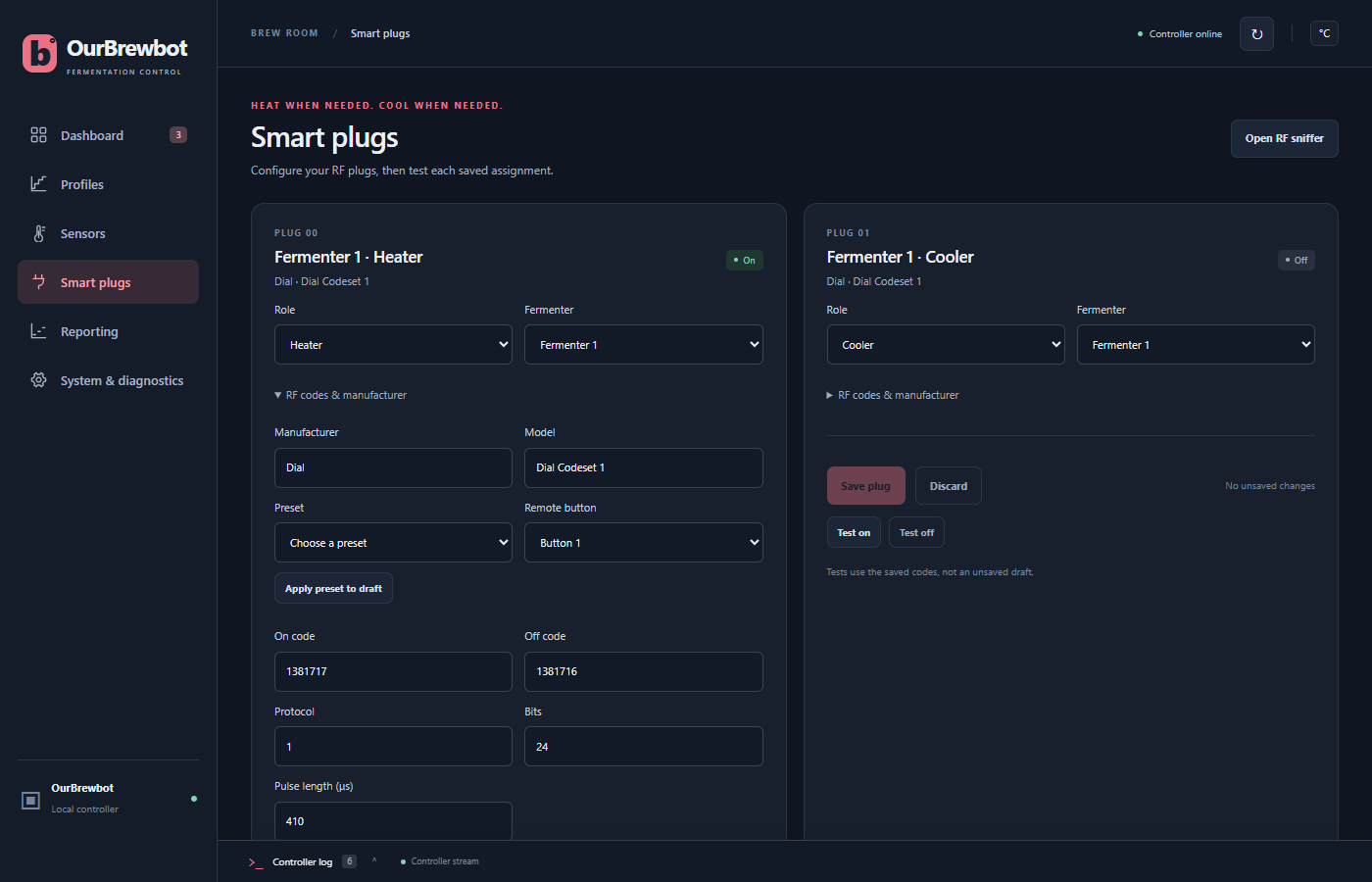
The controller switches heaters and coolers with 433 MHz remote control plugs, the kind sold with a small handheld remote. The Smart plugs page has a card for each of up to ten plugs.
Giving a plug a job#
Choose the plug's Role and Fermenter, then press Save plug:
- Heater is switched on when the fermenter is below its floor.
- Cooler is switched on when the fermenter is above its ceiling, such as a fridge.
- Auxiliary 1 and Auxiliary 2 come from the original MyBrewbot firmware. A plug can be given one of these roles, but nothing switches it yet.
- Unassigned leaves the plug unused.
A fermenter can have more than one heater or cooler, and they're switched together.
The badge on each card shows whether the controller last switched the plug On or Off. The plugs can't send anything back, so it can't tell if a plug missed the signal.
The plug's codes#
Open RF codes & manufacturer to see the codes the controller sends to switch the plug.
If your plugs are one of the makes in the Preset list (Dial, ZAP or Arlec), choose the preset and the Remote button that switches this plug on your remote, then press Apply preset to draft. That fills in the codes. Then press Save plug.
For other plugs, find the codes with the RF sniffer: press Open RF sniffer at the top of the page, start listening, and press the plug's on and off buttons on its remote. Copy what it shows into:
| Field | What it is |
|---|---|
| On code, Off code | The numbers that switch the plug on and off |
| Protocol | The RF protocol, from 1 to 12 (most plugs use 1) |
| Bits | How many bits each code has, usually 24 |
| Pulse length (µs) | The length of each pulse, in microseconds |
Sending a code must take less than 2 seconds, so the controller refuses timings that would take longer.
Manufacturer and Model are only labels, shown on the card.
Testing a plug#
Test on and Test off send the plug's saved codes, so save any changes first. They switch the real plug, and ask you to confirm first.
All the plugs are switched off before the controller is restarted or its settings are reset from the admin page, and while it installs a firmware update.